FAB Balance Check Online 2026: View Your Salary in Just 1-Click!
Checking your bank balance is very important in daily life. It helps you know how much money you have and plan your spending easily. If you are using FAB (First Abu Dhabi Bank), you can do a FAB balance check in a few simple ways without any difficulty.
In this guide, you will learn how to do a FAB balance check step by step. You can use your mobile phone, ATM, or online banking. All methods are easy and quick, even if you are new to banking.
FAB Balance Check via PPC Portal
If you are using a FAB prepaid card, like Ratibi or any other prepaid card, the PPC Inquiry Portal is one of the fastest ways to check your balance. This portal is also called PPC Magnati. It is simple and works in a few seconds.
Step 1: Open the PPC Inquiry website (https://ppc.magnati.com/ppc-inquiry/) on your mobile or computer.
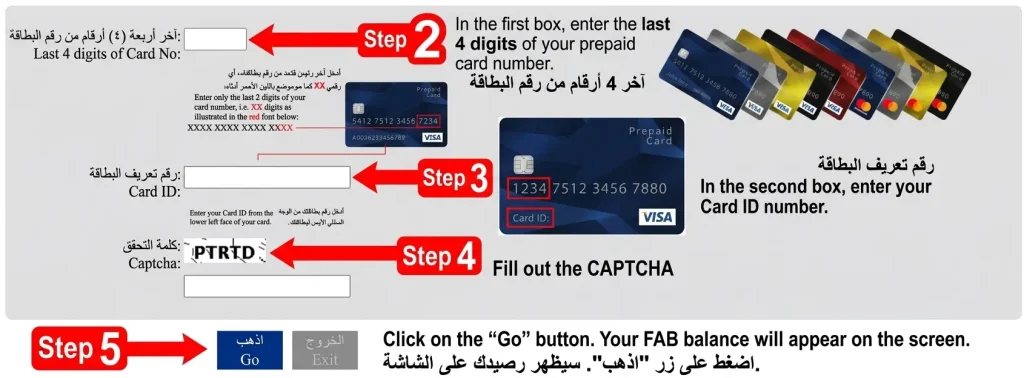
Step 2: In the first box, enter the last 4 digits of your prepaid card number.
Step 3: In the second box, enter your Card ID number.
Step 4: Fill out the "CAPTCHA."
Step 5: Click on the “Go” button. Your FAB balance will appear on the screen.
Result Screen After Submission
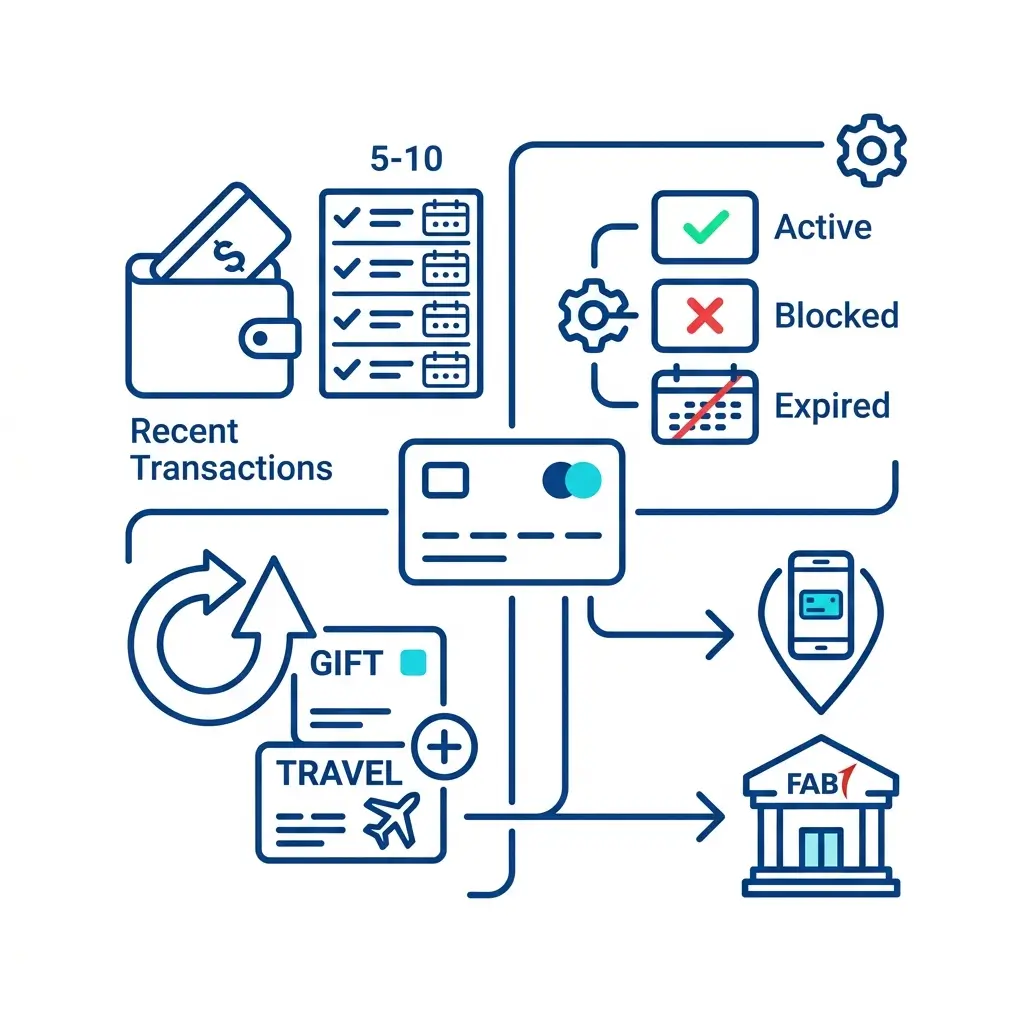
The portal runs on SSL (Secure Socket Layer), protecting your personal information from third-party sites.
Card Features Available Through the Portal
| Feature | Detail |
|---|---|
| Activation | No activation required |
| ATM Access | Domestic ATM and international in-store purchases |
| Portal Access | Free 24/7 via prepaid online portal |
| Bank Account Needed | No |
| PIN Setup | Set at any FAB ATM |
| CDM Network | Free 24/7 access |
| Monthly Charges | None |
| Minimum Balance | None |
| Statements | Free per cardholder |
| Balance Enquiry | Free online at ppc.magnati.com |
Security Controls
Troubleshooting Tips
FAB Balance Check Using the FAB Mobile App
The FAB mobile app is the most popular way to check your balance and once you've used it, it's easy to see why. It shows savings, current, and credit card account balances instantly from a single home screen.
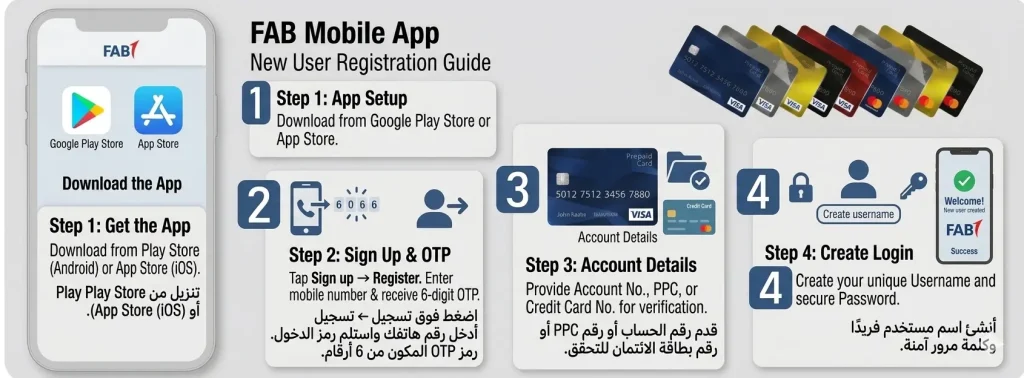
For New Users —> Registration
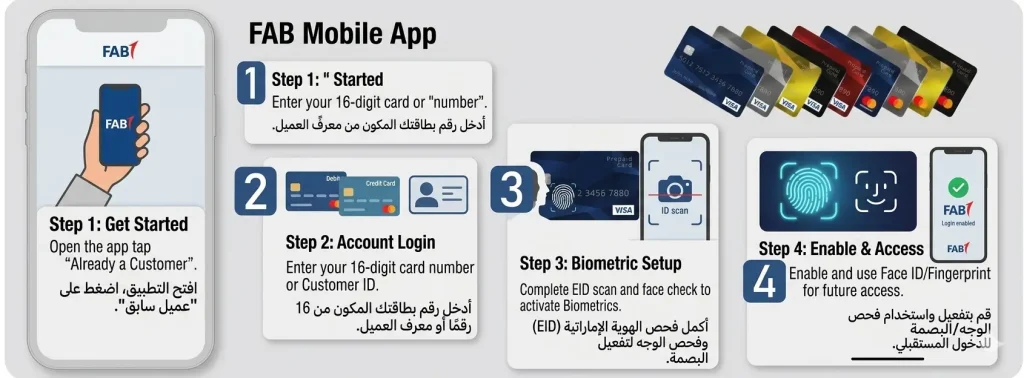
For Existing Users —> Login
What the App Lets You Do
- View available balances and ledger balance instantly on the home screen
- See all accounts — savings, current, credit cards — in one place
- Download statements
- Transfer money and pay bills
- Block or unblock cards and change your ATM PIN
- Get push alerts when money moves in or out
- Log in via UAE Pass
Troubleshooting
| Problem | Fix |
|---|---|
| Can't log in | Check internet, try again, or reinstall |
| Balance not updating | Log out and back in to refresh |
| App crashing or slow | Update the app, restart your phone, or clear storage |
| Think you've been scammed | Call FAB immediately to block the card |
Safety Tips
- Turn on biometric login (Face ID or fingerprint)
- Never share your OTPs or passwords with anyone
- Log out after using the app on a shared phone
FAB Balance Check via Payit Wallet App
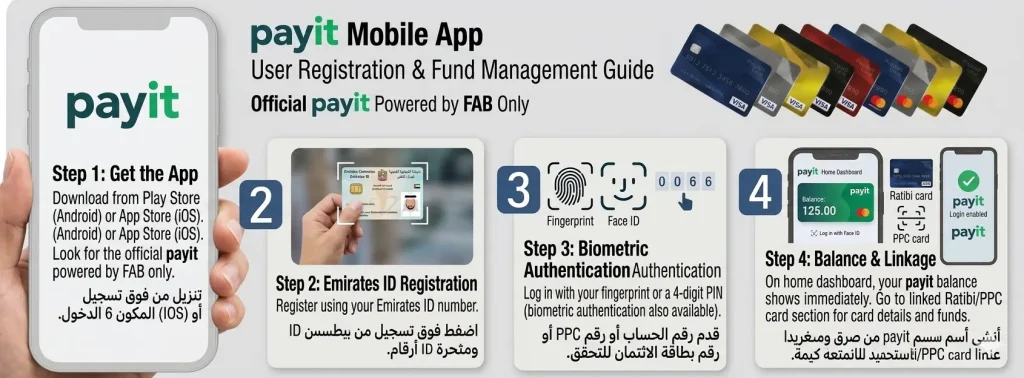
Payit is FAB's official digital wallet designed for prepaid card holders, government card users, and Ratibi card holders who want a simple way to check funds, send money, pay bills, or do wallet to wallet transfers.
Before You Start Have Ready
- Emirates ID
- UAE Mobile number for verification
Steps
- Download the Payit app from the Google Play Store or App Store (official Payit powered by FAB only)
- Register using your Emirates ID number
- Log in with your fingerprint or 4-digit PIN (biometric authentication also available)
- On the home screen dashboard, your payit balance shows immediately
- If you linked a Ratibi card or PPC card, go to the relevant section FAB account details and current funds appear instantly
Tip: Go to Settings Show Linked Card Balances to make all connected cards (including the Dwallet card) visible in one view.
Troubleshooting
| Problem | Fix |
|---|---|
| Zero balance showing | Check your wifi connection, then log out and back in |
| Balance not updating | Refresh → Settings → Apps → Payit → Storage → Clear Cache → update app |
| FAB card not syncing with Payit | Turn on "Show Linked Card Balances" in Settings; remove and re-add your Ratibi or Dwallet card |
| Still not resolved | Call 600 54 3329 (UAE) or +971 2 499 6411 (outside UAE) |
FAB Balance Check via SMS Banking
No internet? No problem. SMS banking works on any phone, requires no data, and delivers your FAB balance inquiry straight to your messages within seconds.
Step 1: Register for SMS Banking
Choose any of the three registration options:
FAB ATM
Insert FAB debit card → enter ATM PIN → SMS Banking → Register → confirm mobile number → set 4-digit SMS PIN
Customer Care
Call 600 52 5500 (UAE) or +971 2 681 1511 (international) → provide account number, Emirates ID, mobile number → set SMS PIN
FAB Branch
Visit with Emirates ID and debit card → ask teller to register → set 4-digit SMS PIN
Note: Your SMS PIN is completely separate from your ATM PIN. Keep it private.
Step 2: Send the SMS
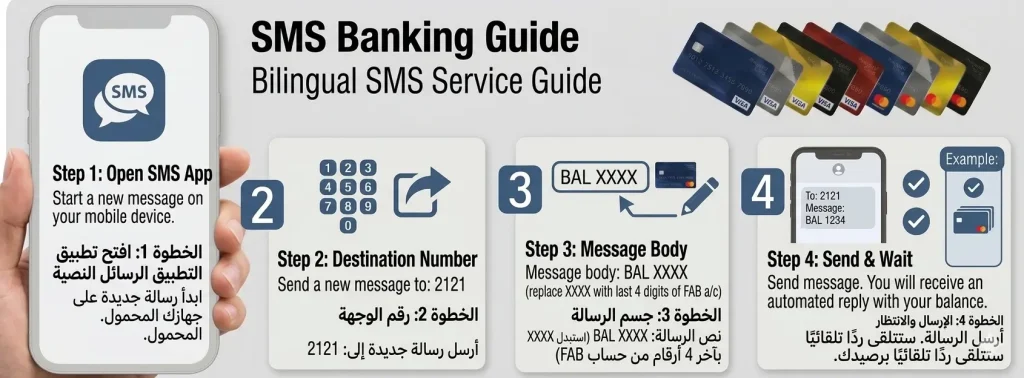
Step 3: Read Your Reply
Within 30 to 60 seconds, FAB-BANK replies with:
FAB Balance Check via Phone Banking / Customer Care
Phone banking is perfect when you have no internet, prefer not to use apps, or need a real person to help. It works on any phone even a basic Nokia and is available 24/7.
Contact Numbers
| Location | Number |
|---|---|
| UAE | 600 52 5500 |
| International | +971 2 6811511 |
| Alternative UAE | +971 2 61 1511 |
| Alternative helpline | 800 832 / +971 2 611 7777 |
Steps
- Dial the appropriate number above
- Select your language Press 1 for English / Press 2 for Arabic
- Navigate to Balance Inquiry from the account services menu
- Verify your identity
Verification — Automated System Typically Asks For
- Account number
- Date of birth
Customer Service Representative May Ask For (2–3 of the following)
- 16-digit FAB Account Number
- 16-digit FAB Debit Card Number
- 16-digit FAB Credit Card Number
- FAB Customer ID Number
- Full name
- Emirates ID Number
- Date of birth
- Registered mobile number
- 4-digit ATM PIN
- Registered address
Other Services Available via Phone Banking
- Block a lost debit card or credit card
- Check due payments on a loan
- Transfer money between your own accounts
- Update your registered phone number
- Request card replacement or reactivation
FAB Balance Check via PPC Portal
The FAB online banking portal is ideal for desktop and laptop users who want a full view of their finances balance checks, statements, transfers, and bill payments all in one place.

- Open any browser Chrome, Safari, or Edge
- Go to https://www.bankfab.com/en-ae/personal
- Click Login (top right corner)
- Under Personal Banking, select Personal Online Banking UAE
- Enter your username and password
- Complete Multi-Factor Authentication (MFA) enter the OTP sent to your registered mobile number or email
- Click Submit
FAB Balance Check at ATM
ATMs are the most direct, no-internet option for checking your First Abu Dhabi Bank balance. Insert your card, enter your PIN, and your balance is on screen in seconds 24/7, across the entire UAE.
Finding a FAB ATM
Use the FAB Branch Locator on the official website
Search "FAB ATM near me" on Google Maps
Use the FAB Mobile App → Locate Us → filter for nearby ATMs
FAB ATM Network Across the UAE
| Emirate | ATMs | Popular Locations |
|---|---|---|
| Abu Dhabi | 400+ | Corniche, Yas Mall, Al Wahda Mall, Khalifa Business Park, Al Qurm |
| Dubai | 500+ | Dubai Mall (Lower Ground Level), Dubai Marina (Marina Walk), Deira, JLT, Business Bay |
| Sharjah | 150+ | Rolla, Al Nahda, City Centre Sharjah |
| Ajman | 80+ | Ajman City Centre, Corniche Road |
| Ras Al Khaimah | 60+ | Al Hamra Mall, Manar Mall, Al Naeem Mall (Al Qusaidat) |
| Fujairah | 40+ | City Centre Fujairah, Hamad Bin Abdulla Rd |
| Umm Al Quwain | 20+ | King Faisal Road, UAQ Corniche |
Steps for Check your Balance
- Insert your card into the card slot with the chip facing up
- Enter your 4-digit PIN cover the keypad with your other hand
- Select your language (English or Arabic)
- Choose Balance Inquiry from the main menu
- If multiple accounts are linked, select the one you want to check
- Your available balance and total balance appear on screen along with the last 4 digits of your account number and the date and time
- Choose to print a receipt or skip
- Press Exit, wait for the ATM to return your card, then leave
Card Types Supported at FAB ATM
| Card Type | What You See |
|---|---|
| Salary Card | Monthly salary amount loaded by employer |
| Ratibi Card (payroll) | Balance from direct employer salary load |
| Prepaid Card | Available loaded balance (reloadable, usable internationally) |
| Debit Card | Full account balance |
| Credit Card | Credit limit and outstanding balance |
Common ATM Problems and Fixes
| Problem | Fix |
|---|---|
| Card not reading | Wipe chip gently; try another FAB ATM |
| Wrong PIN / card blocked | 3 unsuccessful attempts blocks the card call FAB or visit a branch for PIN reset |
| Balance not showing | Tap Back and reselect Balance Inquiry; try another ATM |
| Card not recognised | Wipe chip and magnetic stripe; reinsert slowly; visit branch for replacement if needed |
| ATM swallowed your card | Note the ATM ID on screen; go to the nearest FAB branch with your Emirates ID |
| Receipt not printing | Balance still shows on screen note it and collect your card |
Safety Tips at the ATM
- Never share your PIN with anyone
- Always cover the keypad when entering your PIN
- Use ATMs in well-lit areas avoid isolated locations
- Check for skimming devices before inserting your card
- Always take your printed receipt and card before leaving
FAB Balance Check at Branch
Some things are best handled face-to-face. Visiting a FAB branch gives you the most thorough account overview of any method and it's the only way to get certain official documents.
Branch Hours: Sunday to Thursday, 8 AM to 2 PM (closed Friday and Saturday)
- Use the FAB Branch Locator on the official website to find your nearest branch
- At the branch, go to the Ticket Machine → select Teller services or Account Inquiry
- Take your queue ticket and wait for your number on the display screen
- When called, tell the teller: "I would like to check my bank balance"
- The teller will verify your identity using Emirates ID, FAB card or account number, full name, and date of birth if required
- Receive your available balance and total ledger balance verbally or printed
FAB Balance Check Through AI Virtual Agent
FAB's AI Virtual Agent is an AI-powered voice assistant that uses Natural Language Processing (NLP) to understand your requests naturally no need to remember exact menu options or keypad sequences. You speak in English or Arabic, and it handles the rest.
- Call FAB Customer Care on the numbers Below
- The AI-powered voice assistant answers speak naturally, no robotic commands needed
- State your request, for example: "I want to check my account balance" or "I need help with my credit card"
- Complete Multi-Factor Authentication provide your account number, Emirates ID, or other identifying information; OTPs and ID confirmation are part of this step
- Your balance is read back through AI Voice instantly
Contact Numbers
- UAE: 600 52 5500
- International: +971 2 6811511
FAB Balance Check Through WhatsApp
There's a lot of outdated information online about this, so let's be direct: FAB has not launched any official WhatsApp banking service.
No WhatsApp Banking features available from FAB
No official WhatsApp number for balance checks
No way to transfer money or perform banking tasks through WhatsApp
The only WhatsApp contact associated with FAB is +1 704 771 0476 — and that exists only for reporting scams and fraud, not for customer banking.
FAB has confirmed this directly on bankfab.com's help-and-support page: "No WhatsApp Banking Service FAB has not officially launched WhatsApp banking for customers."
If anyone contacts you via WhatsApp claiming to be FAB support, treat it as suspicious. Use the verified channels instead: mobile app, online banking, ATM, SMS, or phone at 600 52 5500 / +971 2 681 1511.
FAB Ratibi Card Balance Check
The Ratibi card is widely used across the UAE workforce especially by employees whose employers manage payroll without standard bank accounts. The employer loads the monthly salary directly onto the card, and the Ratibi Card Portal gives workers a fast, browser-based way to verify what's been credited.
Ways to Check Ratibi Balance
Ratibi Card Portal
Go to the Ratibi website, enter your card details no login required
FAB Mobile App
Log in and navigate to your linked Ratibi card section
FAB Online Banking
Log in and check salary account statements
FAB ATM
Insert Ratibi card → PIN → Balance Inquiry
Why the Portal Works Well for Ratibi Users
- No login or account setup needed
- Browser-based and lightweight works on any device
- Shows the latest salary deposits in real time
- Great for users working shifts or in areas with limited connectivity
Salary account holders use the portal every month to confirm the employer has credited the correct monthly salary. For a full breakdown of past salary deposits, the FAB Mobile App and FAB Online Banking offer complete salary details for any selected period.
Common Issues While Checking the FAB Balance
Problems happen but most of them have a simple fix. Here's a full breakdown by channel:
Portal / Website Issues
| Problem | Fix |
|---|---|
| Gateways or portal not loading | Switch between mobile data and Wi-Fi; clear browser cache and cookies; wait a few minutes |
| Incorrect card ID or digits error | Re-enter card digits carefully, one at a time; double-check your Card ID |
Mobile App Login Issues
| Problem | Fix |
|---|---|
| Wrong username or password | Check Caps Lock; re-enter slowly; use Forgot Password to reset via registered mobile or email |
| Account locked | Wait the stated X minutes; tap Forgot PIN and reset via OTP |
| OTP not received | Settings → Profile → confirm registered mobile number; tap Resend OTP after 60 seconds; improve signal or switch between Wi-Fi and mobile data |
| Unregistered mobile number | Register at a FAB ATM (Card → PIN → SMS Banking → Register) or visit a branch with Emirates ID |
ATM Issues
| Problem | Fix |
|---|---|
| Balance not showing | Tap Back and reselect Balance Inquiry; try another FAB ATM location |
| Card not recognised | Wipe chip and magnetic stripe; reinsert slowly; try a different ATM or visit branch for card replacement |
| ATM swallowed your card | Note the ATM ID; go to the nearest linked FAB branch with your Emirates ID |
SMS Banking Issues
| Problem | Fix |
|---|---|
| No reply received | Check you're sending from your registered number; use format BAL 1234 (with a space); wait 1 to 2 minutes; resend |
| Message failed to send | Check airtime and SMS credits; confirm network bars; retry |
App and Website Crashes
| Problem | Fix |
|---|---|
| Mobile app crashes | Close fully → restart phone → update or reinstall |
| Website won't load or times out | Switch to a faster connection; clear browser cache and cookies; try again after a few minutes |
For any problem that self-service can't solve, tap Assistance at an ATM screen or call FAB at 600 52 5500.
FAB Balance Check Methods Comparison
Every method comes with trade-offs. Here's a clear side-by-side comparison:
Best Overall: The FAB Mobile App wins for most users instant, free, secure with biometric login and encryption, and gives you multiple accounts, complete transaction history, and full banking features in one place.
Best for Ratibi Cards: Payit its features are purpose-built for Ratibi card management and digital wallet use.
Tips for Smooth FAB Balance Check
A few simple habits make every balance check method more reliable:
- Keep your login details safe don't write them on your card or store them unsecured
- Update the FAB app regularly outdated versions cause most crashing and login issues
- Use secure networks avoid public Wi-Fi when accessing your account online
- Set up balance alerts in the FAB mobile app or online banking get notified the moment your balance drops below a set threshold, so you don't need to check manually every day
- Ratibi salary account holders link alerts to your payroll dates so you know immediately when your salary is credited
- Prepaid card holders a low balance alert prevents a declined payment at checkout
- Check at least once or twice a week through whichever method fits your routine it's enough to catch anything unusual before it becomes a real problem
FAQs About FAB Balance Check
How to check fab balance?
Two reliable options:
FAB Mobile App: download the app, log in with your credentials or biometric authentication, and your account balance appears on the home screen instantly
FAB Online Banking: go to bankfab.com, log in, complete OTP verification, and the dashboard shows your main balance and recent transactions
Both pull from the same real-time data, so the balance will match across both.
Does the bank charge any fees to check the balance?
Checking your FAB balance is free through the FAB Mobile Banking app, Online Banking, and FAB ATMs. The only exception is SMS Banking, where your mobile provider may apply standard SMS charges, the fee comes from your carrier, not from FAB.
Are there any charges if we check the FAB Bank Balance at a FAB ATM?
No, FAB cardholders check their balance at FAB ATMs for free. Fees only appear at non-FAB or third-party ATMs, where the ATM operator may apply their own charge. Using FAB machines keeps it free every time.
What is the SWIFT Code of First Abu Dhabi Bank?
The SWIFT Code for First Abu Dhabi Bank is NBADAEAAXXX. This code is used for international wire transfers and traces back to the bank's former NBAD identity it remains active in the international SWIFT system even after the 2017 merger.
Is SMS banking available internationally?
SMS banking works internationally, but international SMS charges from your telecom provider will apply. For international use, the FAB Mobile App (with internet) or calling +971 2 681 1511 are more practical options.

Conclusion
Checking your FAB balance takes seconds, no matter which method you choose. Whether you prefer the app, ATM, SMS, or a branch visit, FAB keeps your finances within easy reach anytime, anywhere across the UAE.

Hana Al Rostamani 
I’m Hana Al Rostamani, a banking professional passionate about digital finance, customer services, and modern banking solutions in the UAE. I share helpful insights to make banking easier and more understandable for everyone.